
Checking on demerits given

“How can I see the demerits and interventions that have been set in my department?”
Thanks for the great question There are two ways to do this – one on epraise and one in excel. Please see the methods below.
Please see the method below. Keep writing in to “Ask epraise” to have your questions published and answered.
Checking to see how many demerits have been given in my department (or year)
This will show you demerit and intervention information up to the end of the previous week.
· Open the spreadsheet:
S:\STUDENT DATA\2023-2024\epraise\epraise Demerits Report 2023-24
· Click on the “Analysis” worksheet
This shows you “Top 10” statistics on all demerits given since the start of term
· Click on the “Data” worksheet
You can now filter on a particular subject (column G), year group (column E), term (column A), etc.
· Click on the “Analysis” worksheet
The “Top 10” statistics will now take into account your filter
Checking if a demerit has been added on epraise
This will show you up to date information on the most recent demerits and interventions given to a student.
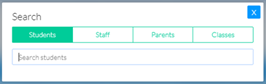
· Search for the student using the magnifying glass icon

· Type the student’s name in the search box (choose the student as soon as they appear)
· Click on the cogs icon (top right of screen)

· Click on “Demerits” (or “Interventions”)

· Scroll to the bottom of the page and look at the demerits table (the most recent are at the top)